Debugging a Blue-Green Deployment from Scratch: Six Errors, Six Fixes, One Working System
We recently set up a blue-green deployment pipeline for a Node.js/Next.js marketplace application running on a single VPS, with GitHub Actions as the CI/CD layer and nginx as the reverse proxy. The sy
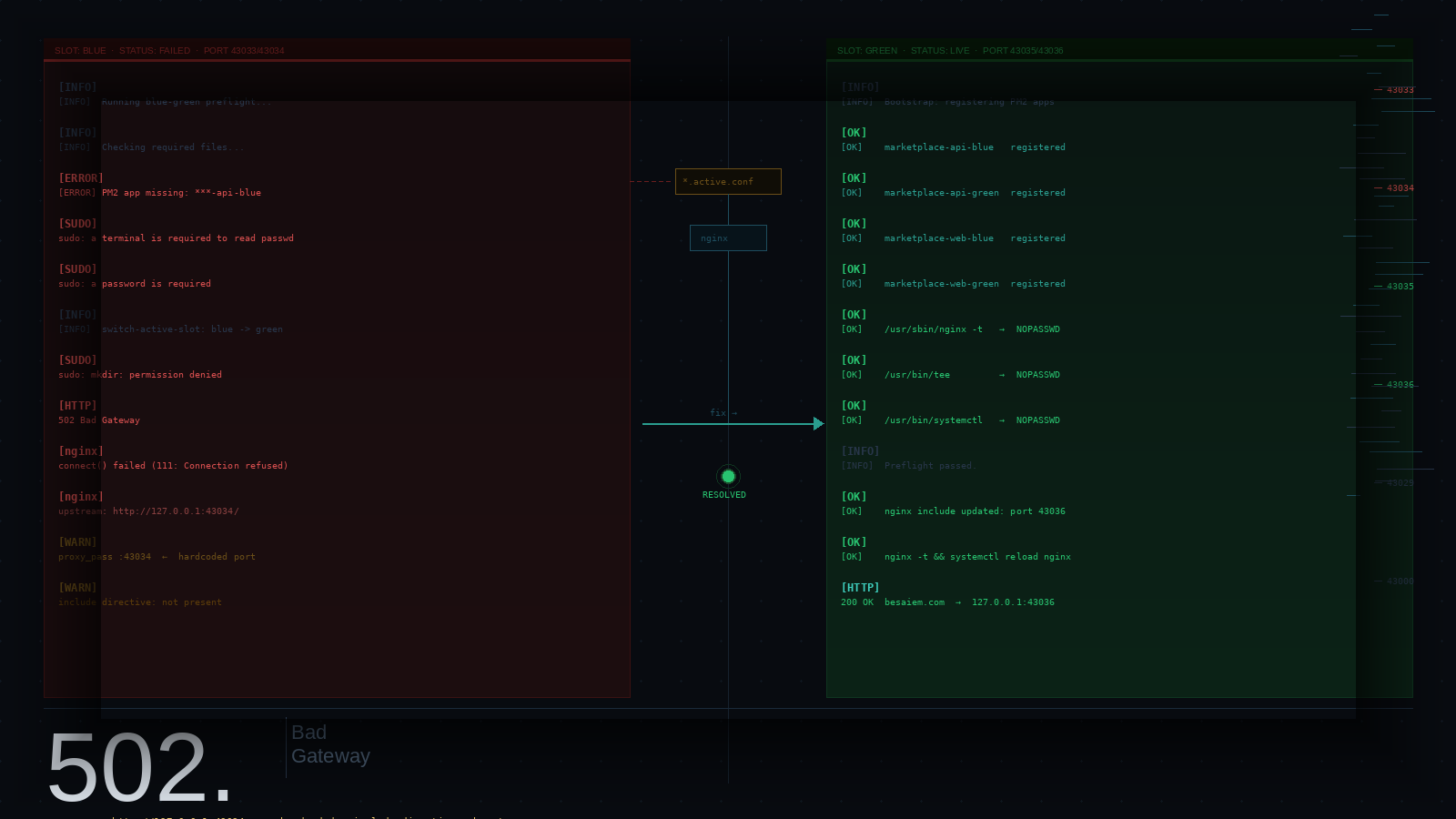
We recently set up a blue-green deployment pipeline for a Node.js/Next.js marketplace application running on a single VPS, with GitHub Actions as the CI/CD layer and nginx as the reverse proxy. The system looked clean on paper: two deployment slots (blue and green), a preflight script to verify server state before each cutover, and a slot-switching script that rewrites nginx include files and reloads the server atomically.
What followed was a methodical chain of six distinct failures, each exposing a different class of problem in the relationship between CI/CD pipelines, sudo permissions, PM2 process management, and nginx configuration. This post documents each failure, why it happened, how we fixed it, and what needs to be in place from the start to prevent it from recurring.
The Architecture
Before getting into the failures, it helps to understand the system's moving parts.
The deployment is split across several shell scripts. deploy-api.sh and deploy-web.sh run on the server during a deployment and install dependencies, run migrations, and start PM2 processes. preflight-blue-green.sh runs before any production slot switch and verifies that all required files, directories, slot state files, nginx include files, and PM2 processes are present and valid. switch-active-slot.sh rewrites two nginx include files — one for the API upstream, one for the web upstream — to point at the new slot's ports, then reloads nginx.
The port assignments are fixed:
| Slot | API port | Web port |
|---|---|---|
| Blue | 43033 | 43034 |
| Green | 43035 | 43036 |
The nginx site configs for production include these upstream files dynamically rather than hardcoding a port, so switching slots is a matter of rewriting a single line in each include file and reloading nginx — no config file surgery required.
That was the design. The reality required some work to get there.
Failure 1: The PM2 Apps Did Not Exist
Error:
[ERROR] PM2 app missing/not registered: ***-api-blue
The *** was GitHub Actions redacting the app name prefix because it matched a secret value — specifically, the deploy username. The underlying error was real regardless: pm2 describe marketplace-api-blue was returning a non-zero exit code because the process had never been registered.
Why it happened:
PM2's pm2 describe <name> only returns success for processes that have been started at least once in the current user's PM2 daemon. On a freshly provisioned server, nothing had run a deployment yet, which meant the four required processes — marketplace-api-blue, marketplace-api-green, marketplace-web-blue, marketplace-web-green — did not exist in the process list. The preflight runs before the first deployment, creating a chicken-and-egg problem: the preflight expects registered apps, but apps only get registered by a successful deployment.
Additionally, pm2 list on the server showed green and staging variants were registered, but blue was absent entirely — meaning the initial bootstrap had been run inconsistently.
The fix:
Register all four apps using a zero-exit placeholder script before the first deployment:
node -e "process.exit(0)" > /tmp/pm2-placeholder.js

for name in marketplace-api-blue marketplace-web-blue marketplace-api-green marketplace-web-green; do
  pm2 start /tmp/pm2-placeholder.js \
    --name "$name" \
    --stop-exit-codes 0 \
    --no-autorestart
  pm2 stop "$name"
done

pm2 save
PM2 only needs a process to have been started once for pm2 describe to recognise it. Starting with a placeholder and immediately stopping it gives the preflight what it needs without requiring a real build to be present.
Failure 2: sudo nginx -t Required a Password
Error:
sudo: a terminal is required to read the password; either use the -S option to
read from standard input or configure an askpass helper
sudo: a password is required
This appeared during the preflight's final check: sudo nginx -t.
Why it happened:
The sudoers file written by setup-server.sh granted passwordless access to specific commands, but preflight-blue-green.sh called bare sudo nginx -t without an explicit binary path. Sudo's NOPASSWD rules match on the exact command string. If the sudoers file contained /usr/sbin/nginx -t but the shell resolved nginx to /usr/bin/nginx (or vice versa, which is common on systems where /bin and /usr/bin are not yet unified), the grant did not match, and sudo fell back to requiring a password.
The fix:
Add the correct explicit path to the sudoers file. Because appending to /etc/sudoers.d/ requires root, and the deploy user cannot use >> to write there, the correct approach is to pipe through sudo tee:
NGINX_BIN="$(command -v nginx)"
echo "marketplace ALL=(ALL) NOPASSWD: $NGINX_BIN -t" \
  | sudo tee -a /etc/sudoers.d/marketplace-deploy
sudo visudo -cf /etc/sudoers.d/marketplace-deploy
And update preflight-blue-green.sh to call the explicit path:
sudo /usr/sbin/nginx -t >/dev/null
The lesson here is that sudoers rules must be constructed with the same binary resolution mechanism used at runtime. command -v at install time and command -v at runtime can produce different results depending on PATH, especially in non-interactive SSH sessions where profile files may not be sourced.
Failure 3: switch-active-slot.sh Had an Uncovered sudo mkdir
Error:
sudo: a terminal is required to read the password; either use the -S option to
read from standard input or configure an askpass helper
sudo: a password is required
This time the error appeared during the slot switch itself, not the preflight.
Why it happened:
switch-active-slot.sh begins with:
sudo mkdir -p "$NGINX_INCLUDE_DIR"
This call was not in the sudoers file at all. The directory /etc/nginx/includes already existed from the initial server setup, so the mkdir -p was a no-op in practice — but sudo still evaluated the permission before executing the command, and the grant wasn't there.
The fix:
Rewrite the sudoers file cleanly with all required grants, using explicit binary paths resolved at the time of writing:
NGINX_BIN="$(command -v nginx)"
SYSTEMCTL_BIN="$(command -v systemctl)"
MKDIR_BIN="$(command -v mkdir)"
TEE_BIN="$(command -v tee)"

sudo tee /etc/sudoers.d/marketplace-deploy > /dev/null <<EOF
marketplace ALL=(ALL) NOPASSWD: $MKDIR_BIN -p /etc/nginx/includes
marketplace ALL=(ALL) NOPASSWD: $TEE_BIN /etc/nginx/includes/marketplace-production-api-active.conf
marketplace ALL=(ALL) NOPASSWD: $TEE_BIN /etc/nginx/includes/marketplace-production-web-active.conf
marketplace ALL=(ALL) NOPASSWD: $NGINX_BIN -t
marketplace ALL=(ALL) NOPASSWD: $SYSTEMCTL_BIN reload nginx
EOF

sudo visudo -cf /etc/sudoers.d/marketplace-deploy
Overwriting the file rather than appending is the safer approach — it prevents accumulating redundant or conflicting lines from previous fix attempts.
Failure 4: The 502 After a Successful Deployment
Error:
The deployment reported success. The preflight passed. The slot switch completed. Nginx reloaded. The site returned 502 Bad Gateway.
Why it happened:
The nginx error log showed:
connect() failed (111: Connection refused) while connecting to upstream,
upstream: "http://127.0.0.1:43034/"
Port 43034 is the blue web slot. The slot switch had already updated the include files to point at green (43036) and curl http://127.0.0.1:43036 was returning 200. But nginx was still routing to 43034.
The nginx site config for the production web domain — prod-web-besaiem — had a hardcoded proxy_pass directive:
location / {
    proxy_pass http://127.0.0.1:43034;
    ...
}
The include files that switch-active-slot.sh carefully updated were never referenced by any site config. They existed on disk and were correctly maintained, but nginx was ignoring them entirely because no include directive pointed at them.
The same problem existed in the API config — prod-api-besaiem had proxy_pass http://127.0.0.1:43033; hardcoded.
Why this happened:
Two separate scripts created the nginx site configs during initial server setup — setup-server.sh and setup-nginx.sh — and they produced configs with different structures. setup-nginx.sh (the intended final configuration) correctly used the include directive. setup-server.sh (the initial bootstrap) wrote hardcoded proxy_pass lines. The hardcoded versions were the ones active in /etc/nginx/sites-enabled/, and they were never replaced.
The fix:
Replace the hardcoded proxy_pass lines with include directives in the active site configs:
sudo sed -i \
  's|proxy_pass http://127\.0\.0\.1:43034;|include /etc/nginx/includes/marketplace-production-web-active.conf;|' \
  /etc/nginx/sites-available/prod-web-besaiem

sudo sed -i \
  's|proxy_pass http://127\.0\.0\.1:43033;|include /etc/nginx/includes/marketplace-production-api-active.conf;|' \
  /etc/nginx/sites-available/prod-api-besaiem

sudo nginx -t && sudo systemctl reload nginx
Because the include files already pointed at green (43035/43036) from the slot switch that had already run, traffic immediately routed correctly after the reload — no redeployment was needed.
Root Cause Analysis
Looking across all four failures, three underlying problems produced the entire chain:
1. Server state was not initialised before the first deployment.
The preflight script assumes a specific server state — registered PM2 apps, valid slot files, and nginx includes pointing at known ports. None of this exists on a freshly provisioned server. Without a bootstrap script that creates this state before CI/CD runs for the first time, the first deployment will always fail the preflight.
2. Sudoers grants were built incrementally rather than comprehensively.
Every sudo call made by the deployment scripts needs an explicit grant with an exact binary path. The grants were added piecemeal as each failure surfaced rather than being defined upfront by auditing every sudo call in every script. A systematic audit of deploy-api.sh, deploy-web.sh, switch-active-slot.sh, preflight-blue-green.sh, and rollback-slot.sh would have identified all required grants before the first run.
3. Two scripts created the same nginx configs with different structures.
setup-server.sh was written to get the server running quickly and hardcoded ports. setup-nginx.sh was written to be the correct long-term configuration and used includes. Both were present in the repo, but only one was used, and it was the wrong one. Having two scripts that produce overlapping but incompatible outputs is a maintenance hazard.
How to Prevent This in the Future
1. Write a comprehensive bootstrap script and run it before the first deployment
The bootstrap script should create every piece of state the preflight checks for:
-
All required directories (
slots/blue/api,slots/blue/web,slots/green/api,slots/green/web,shared/) -
active-slotandpending-slotfiles with valid initial values -
Nginx include files pointing at the default (blue) slot ports
-
All four PM2 apps registered using a placeholder entry point
-
A
pm2 saveto persist the process list across reboots
The bootstrap script should also re-run every preflight assertion itself at the end and exit non-zero if any check fails, so you get a clear confirmation that the server is ready before the first CI run.
2. Audit every sudo call before writing the sudoers file
Before writing /etc/sudoers.d/marketplace-deploy, grep every deployment script for sudo:
grep -rn 'sudo ' scripts/
For each result, record the full command including arguments, resolve the binary path with command -v, and add a corresponding NOPASSWD line. Do this once, comprehensively, rather than adding grants reactively as failures surface.
Also ensure that switch-traffic.sh (or equivalent) reads binary paths from the sudoers file itself rather than re-resolving them with command -v at runtime. The two resolutions can diverge:
# Read the path that was recorded in the sudoers file at install time
TEE_BIN="$(grep -oP 'NOPASSWD:\s+\K/\S+tee' /etc/sudoers.d/marketplace-deploy | head -1)"
3. Consolidate nginx config creation into a single script
Delete or deprecate setup-server.sh's nginx section entirely and make setup-nginx.sh the single source of truth for nginx configuration. The two scripts should not be able to produce conflicting configs for the same domain.
Alternatively, add a verification step to the bootstrap script that confirms the active site configs contain include directives rather than hardcoded ports:
if grep -q 'proxy_pass http://127.0.0.1:4303' /etc/nginx/sites-enabled/prod-web-besaiem; then
  echo "ERROR: prod-web-besaiem has a hardcoded proxy_pass."
  echo "Replace it with: include /etc/nginx/includes/marketplace-production-web-active.conf;"
  exit 1
fi
4. Add a post-deployment smoke check that verifies the include files are being used
After every slot switch, verify that nginx is actually routing to the expected upstream, not just that the include files contain the right content:
ACTIVE_PORT=$(grep -oP '127\.0\.0\.1:\K\d+' /etc/nginx/includes/marketplace-production-web-active.conf)
NGINX_UPSTREAM=\((curl -s --max-time 5 -o /dev/null -w "%{http_code}" "http://127.0.0.1:\){ACTIVE_PORT}/api/health")

if [[ "$NGINX_UPSTREAM" != "200" ]]; then
  echo "ERROR: upstream on port $ACTIVE_PORT is not responding"
  exit 1
fi
This catches the class of bug where the include file is correct, but the site config isn't using it.
5. Test the slot switch in staging first
The staging environment uses a single PM2 process rather than blue-green slots, so it cannot fully exercise the slot switching logic. If your setup allows it, configure a staging equivalent of the blue-green mechanism — even with different port numbers — so that switch-active-slot.sh and preflight-blue-green.sh are exercised on every staging deployment rather than only on production.
Summary
| Failure | Root cause | Fix |
|---|---|---|
| PM2 apps not registered | No bootstrap step before first deployment | Register placeholder apps with pm2 start before CI runs |
sudo nginx -t password prompt in preflight | Binary path mismatch between sudoers grant and runtime resolution | Use an explicit binary path in both sudoers file and script |
sudo mkdir password prompt in slot switch | Incomplete sudoers grants — not all sudo calls were covered | Audit all sudo calls upfront; write a comprehensive sudoers file |
| 502 after successful slot switch | Nginx site configs had hardcoded ports instead of include directives | Replace hardcoded proxy_pass with include in production site configs |
The blue-green deployment mechanism itself was sound throughout — the slot files, include files, PM2 naming, and port assignments were all consistent across every script. The failures were entirely due to the gap between what the scripts assumed about the server's state and what was actually on the server. Closing that gap with a comprehensive bootstrap script and a thorough sudoers audit would have prevented every failure in this chain.